English
 Arabic
 French
 Spanish
 Portuguese
 Deutsch
 Turkish
 Dutch
Dutch
 Italiano
 Russian
 Romaian
 Portuguese (Brazil)
 Greek
Greek
 Download Android App

Cold Chain Market Set for Strong Growth Through 2033 Amid Rising Global Demand
Networking |
2026-07-30 06:22:21
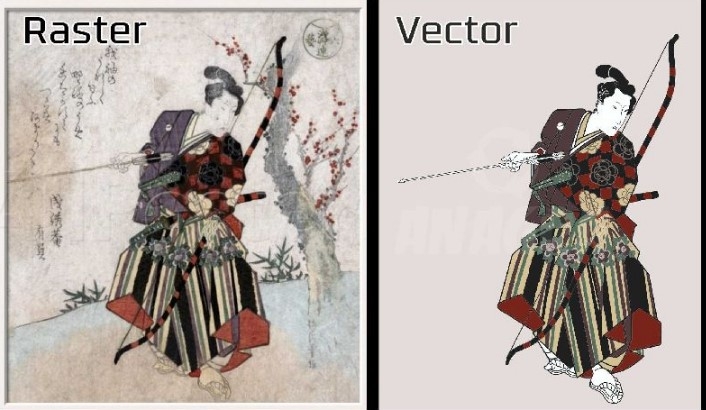
Have you ever enlarged a logo only to find that the edges become blurry and pixelated? That is one of the most common problems with raster images. A small JPG or PNG may look fine on a screen, but it can quickly lose quality when used for large printing.
Professional Vector Art Conversion provides a practical solution. It transforms raster artwork into clean, scalable vector graphics that can be resized without losing sharpness.
Whether you need artwork for business branding, screen printing, embroidery, packaging, signs, or promotional products, a properly converted vector file gives you much more flexibility.
Professional Vector Art Conversion is the process of turning a raster image into a vector-based graphic.
Raster files, such as JPG, PNG, and GIF, are made from individual pixels. When you enlarge them too much, those pixels become visible and the image starts looking blurry.
Vector graphics work differently. They use mathematical paths, lines, curves, shapes, and points to create artwork. Because of this structure, a vector design can usually be enlarged or reduced without losing its basic sharpness.
Common vector formats include:
The right format depends on how you plan to use the artwork.
Imagine printing a small logo on a business card and then using the same logo on a large storefront sign. A low-resolution raster image may look acceptable on the card but become rough and unclear when enlarged.
A vector file is designed to handle this type of scaling.
Professional vector conversion can help create:
This makes vector artwork especially useful for businesses that need to use the same design across different products and sizes.
Understanding the difference between raster and vector artwork makes the conversion process easier to understand.
Raster graphics are built from pixels. Common examples include JPG, PNG, BMP, and GIF files.
They work well for photographs and detailed digital images, but they can become blurry when enlarged.
Vector artwork is created from paths and geometric elements. It can be resized while maintaining clean edges.
Vectors are especially useful for:
In simple terms, raster artwork is like a photograph made from tiny squares, while vector artwork is more like a blueprint that can be redrawn at any size.
Converting artwork into a high-quality vector file is not always as simple as clicking an automatic tracing button. Professional conversion often requires careful manual editing.
The original image is examined for its shapes, colors, text, outlines, and overall structure.
The quality of the source image matters, but even a low-resolution image can sometimes be recreated successfully if its design is clear enough.
Unwanted backgrounds, noise, rough edges, and unnecessary elements may be removed before tracing begins.
This creates a cleaner foundation for the vector artwork.
The main shapes are recreated using vector paths. Curves and corners are adjusted carefully to match the original artwork.
This is one of the most important stages because poorly placed anchor points can create uneven curves.
The vector artwork is reviewed and refined. Smooth curves, consistent outlines, and balanced shapes help create a professional-looking result.
Colors are matched as closely as practical to the original design. Depending on the intended use, colors may be prepared for RGB, CMYK, or other production requirements.
If the design includes text, the lettering may be recreated using appropriate fonts or converted into vector outlines when required.
This can help prevent font compatibility issues during production.
The completed vector file is inspected at different sizes to ensure that paths, colors, spacing, and shapes are clean.
The artwork can then be exported in the required file format.
Many types of artwork can be converted into vector graphics.
Common examples include:
However, not every image should become a vector.
Photographs, complex textures, and highly detailed natural scenes are often better kept as raster images. Vector conversion works particularly well for artwork made from recognizable shapes, lines, text, and solid colors.
Printing is one of the biggest reasons businesses request vector artwork.
A vector file can be used across many print applications without needing to recreate the design for every size.
For example, one logo could be prepared for:
The artwork can be adjusted to the required dimensions while maintaining clean edges.
Many professional printing processes require artwork with clear paths and predictable colors. Vector files make it easier to edit individual elements and prepare designs for production.
For certain printing methods, vector artwork also makes color separation much easier.
Vector artwork and embroidery digitizing are not the same thing, but vector files can provide an excellent starting point for embroidery work.
A clean vector logo clearly defines shapes, outlines, and lettering. A digitizer can use this information when converting the artwork into an embroidery stitch file.
However, a vector file itself is not an embroidery file.
For embroidery, the vector artwork must still be digitized into a machine-readable format such as DST, PES, JEF, or another format supported by the embroidery machine.
There are several reasons to choose professional vector conversion instead of relying entirely on automatic tracing.
Vector graphics can be resized for many applications while preserving clean edges.
Individual shapes, colors, and elements can often be modified independently.
Clean vector paths can help produce sharper logos, signs, labels, and other printed materials.
A master vector logo can be adapted for different marketing materials while maintaining the same basic design.
Once artwork is properly converted, it can often be exported into several useful formats depending on production requirements.
Professional conversion removes unnecessary elements and organizes artwork more effectively, making it easier to work with later.
Professional conversion is especially useful when:
If your artwork is going into commercial production, a properly prepared vector file can save time and prevent costly revisions.
Automatic tracing tools can be helpful for simple artwork. They can quickly detect edges and turn them into vector paths.
The problem is that automatic tracing does not always understand the designer's intent.
It may create:
Professional conversion involves reviewing and correcting these issues manually.
For a basic black-and-white icon, automatic tracing may be enough. For an important business logo, detailed illustration, or production-ready design, manual refinement is often the safer choice.
You can make the conversion process easier by providing the best source file available.
Poor vector artwork can create problems later in the production process.
Adding unnecessary points can make curves difficult to edit and may create rough-looking shapes.
Small color differences may become noticeable when artwork is used for professional printing or branding.
Unclosed shapes can cause problems during editing, cutting, or production.
Replacing the original font with a similar but incorrect typeface can noticeably change a logo's appearance.
A file created for web display may not be properly prepared for large-format printing or other production methods.
If you are outsourcing your artwork conversion, look beyond the price.
Ask to see examples of similar projects. Pay attention to curve quality, details, colors, and overall cleanliness.
Confirm that the service can provide the format your printer, designer, manufacturer, or production partner needs.
Find out whether corrections are included if the converted artwork does not match the original closely enough.
Tell the designer whether the artwork will be used for printing, apparel, signage, packaging, embroidery, or digital marketing.
The more information you provide, the easier it is to create a file that fits your actual needs.
The cost of vector conversion depends on the complexity of the artwork.
A simple logo with a few solid shapes may take much less time than a detailed illustration containing many curves, colors, and small elements.
Factors that can affect pricing include:
Rather than choosing solely based on price, consider the quality and usability of the finished file.
Professional Vector Art Conversion turns ordinary raster artwork into flexible, scalable graphics that can be used across a wide range of applications. From business logos and promotional products to large signs and print materials, clean vector artwork gives you greater control over your design.
The key is not simply converting a file. It is recreating the artwork with accurate shapes, smooth paths, correct colors, and a structure that works for the intended purpose.
If your current logo is blurry, difficult to edit, or unsuitable for professional production, converting it into a well-made vector file can be a smart long-term investment.
Professional Vector Art Conversion is the process of recreating raster artwork as vector graphics using editable paths, shapes, curves, and other scalable elements.
Yes. JPG images can be manually recreated as vector artwork. The final quality depends on the source image and the complexity of the design.
AI, EPS, SVG, and PDF are common vector formats. The best choice depends on how the artwork will be edited, printed, or used.
No. Vector conversion creates scalable artwork, while embroidery digitizing converts artwork into stitch instructions for an embroidery machine. A vector file may be used as source artwork for digitizing.
If your logo becomes blurry when enlarged, cannot be edited easily, or is requested by a printer in AI, EPS, or SVG format, vector conversion may be useful.